What is DaisyDisk?
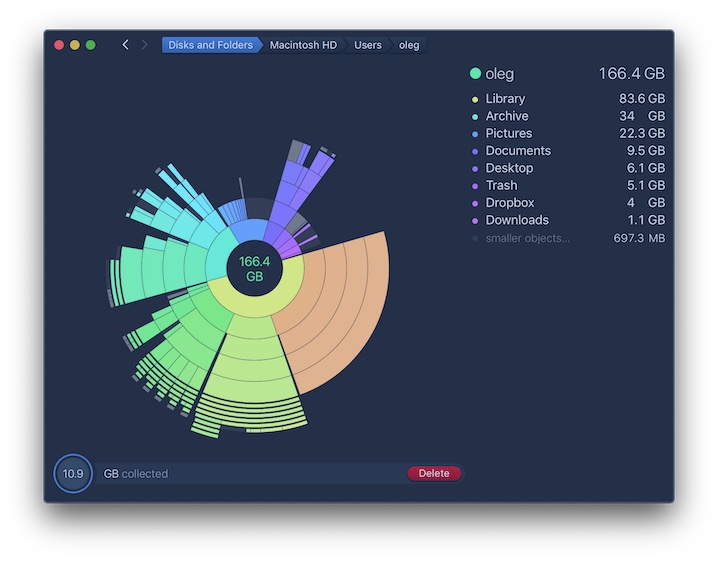
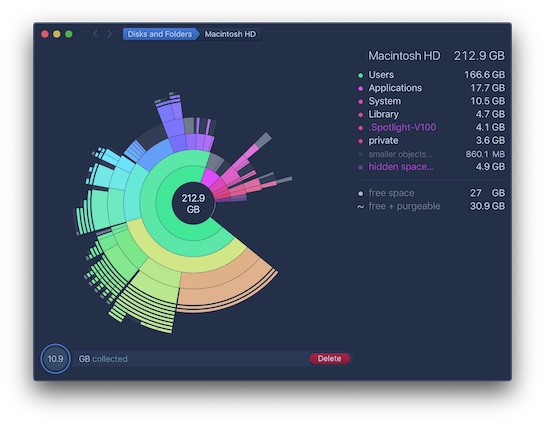
DaisyDisk focuses on a single problem: showing where storage has gone. It scans a selected disk or folder and presents the result as an interactive visual map. Large branches are obvious, and users can drill into folders until they reach the files responsible.
That narrow purpose is a strength. DaisyDisk does not claim that every cache is junk, run maintenance scripts or bundle antivirus features. It gives the owner context and leaves the deletion decision visible.
What does it actually clean?
There is no automatic system-junk routine, duplicate engine or app-leftover database. Instead, the app helps locate large personal files, archives, project data, virtual machines and other real storage consumers. Items can be collected for deletion after review.
DaisyDisk can also scan supported cloud services without downloading every file locally, which is useful when cloud storage costs or redundant local copies are the problem.
Using DaisyDisk
The visual map is fast to understand and unusually polished. Navigation is direct, and the application avoids presenting dozens of unrelated maintenance tools. Users who dislike automated cleanup often prefer this approach because every decision remains tied to a recognisable folder or file.
People looking for a one-click health scan may find the manual workflow too limited. DaisyDisk explains storage; it does not promise to optimise the entire Mac.
Is DaisyDisk safe?
The developer states that scan information stays local and the application reads file names and sizes rather than file contents for its map. Full Disk Access reveals more protected storage but is not required to begin scanning ordinary user folders.
Manual deletion is not automatically safe: a large file can still be important. Keep a backup and understand the owning application before removing library or project data.
Is it worth paying for?
DaisyDisk costs US$9.99 as a one-time purchase for up to five personal Macs, with minor updates included. That makes it one of the clearest values in this comparison for a user whose problem is disk space rather than malware, app leftovers or ongoing maintenance.
The price is less compelling if you already own a suite with an adequate disk visualiser, but the focused interface remains a reason to prefer it.
Should you choose DaisyDisk?
DaisyDisk is our best visual disk-map pick. Choose it when you want to understand storage before deleting anything, especially if you prefer a one-time purchase. Do not choose it expecting automatic junk cleanup, duplicate removal, app uninstall or threat protection.